
What Is Address Verification?
Address verification is an automated feature that syncs your database with the United States Postal Service (USPS) every night. This process:
- Standardizes mailing addresses according to USPS guidelines
- Completes missing address values if found
- Updates addresses for individuals who have moved
By leveraging this tool, organizations can significantly cut postage costs and eliminate the need for manual data entry when addresses change. To learn more about the full process, take a look at our walk through video below:
How to Enable Address Verification
If you already have an Aplos subscription and you are ready to move forward with address verification, follow the below steps to get started!
- Log into your Aplos account.
- Go to the Settings -> Subscription.
- Select Change Subscription button at the bottom of the screen
- Click the plus sign next to Address Verification
- Administrator Requirement: If you are not an Administrator, contact your Administrator to enable this feature.
Cost of Address Verification:
-
Monthly Fee: $10 per month for every 1,000 contacts.
- This fee is charged in addition to your regular Aplos subscription.
- For Contracted Accounts: If your account is in a contract, contact our Customer Care Team for access.
How to Disable Address Verification:
- Log into your Aplos account.
- Navigate to Settings -> Subscription.
- Administrators can disable Address Verification from this page.
How to Set Up Address Verification
Once you have Address Verification enabled, your contacts will automatically be checked against the USPS database each night. Verification runs overnight. Results usually show up the next morning, and occasionally a day later.
To improve the success rate, review your contacts (for example with the Contact List Details report) and make sure each address you want verified meets these requirements:
- The contact is an individual (not a company)
- First name and last name
- A complete US address: street, city, state and ZIP
- The address is not marked Do Not Verify
Every current address on an individual contact is verified — including Home, Work, Other and Mailing Address — as long as it is a complete US address and isn’t marked Do Not Verify.
Address Verification works for individual contacts only. Company contacts are not verified, even if they list a contact person's name. Company addresses keep their existing information but won't receive USPS corrections or change-of-address updates, so keep those up to date manually.
After that, you are finished with setting up your Address Verification! Your Aplos contact records will be synced nightly with the United States Postal Service database to standardize your address formats, complete postal codes, and search for changes in address.
Maintaining Address Verification
With Address Verification now automating your data clean up nightly, you can see it in action from:
- individual contact cards
- address changes screen
Viewing Verified Addresses
To confirm if a contact's address was successfully verified, you will:
- Navigate to a contact’s profile in the People -> Contact List section.
- Under the contact details, a verified stamp appears next to addresses verified by USPS.
- Clicking on the information icon provides confirmation of USPS verification.
- If an address is not verified, it means it was either manually altered or not found in the USPS system.
When an address is corrected (for example, spelling, street name or ZIP+4), the original version of the address is visible on the Address Verification / Address Changes screen, not on the contact profile.
How to Stop an Address from Being Verified
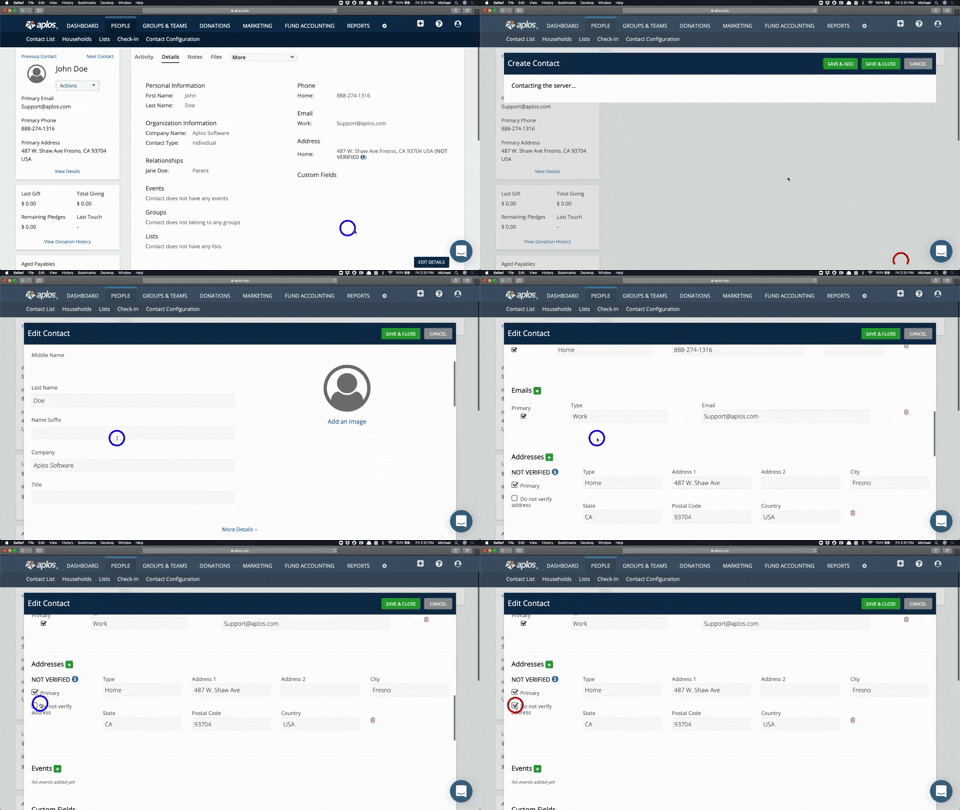
You have the option to turn off Address Verification for any contacts. This will keep their address the same and not update it, resulting in the contact not being verified. To accomplish this, do the following:
- Navigate to the contact's profile card
- Click “Edit Details” and locate the address field
- Check “Do Not Verify” and save your changes.
Viewing Address Changes
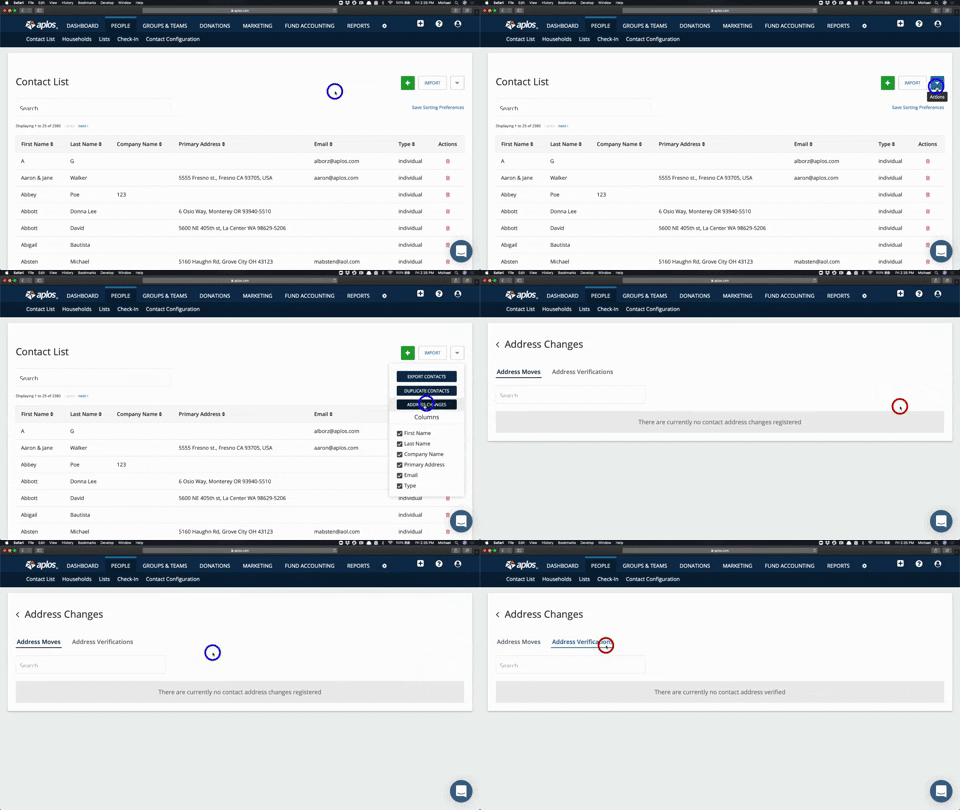
If you want to see all changes that have been made by Address Verification, follow these steps:
- Navigate to the Contact List page.
- Click on the box with a down arrow icon on the top right
- Click on the button “Address Changes.”
- View address moves or address verifications
Each tab displays both the old address and the new address:
- Address Moves: Displays addresses that have changed due to a move
- Address Verifications: Displays addresses that have been updated and verified by the USPS
What happens next depends on the type of update:
- A correction (such as spelling, street name or ZIP+4) updates the address in place and marks it verified. The original version is visible on the Address Verification screen, not on the contact profile.
- A move (USPS change of address) updates the current address to the new one and keeps the old address, labeled “Moved.” Primary status stays the same: the current address keeps its type and primary flag. If the new address already exists on that contact, the old one is just marked Moved and points to the existing address.
Why an Address Couldn't Be Verified
If an address can’t be verified, Aplos shows a reason:
- Invalid (no match): USPS couldn’t find the address.
- Invalid (multi-match): The address matched more than one location, usually because an apartment or suite number is missing.
- Non-mailable (unoccupied): USPS lists the address as vacant.
Troubleshooting
Why is my contact’s address showing “Not Verified”?
If you enable Address Verification, the verification process will run that night, so your contacts may not be verified immediately. If you expect an address to be verified and it still shows as “Not Verified,” check the following:
- Is it a company contact? Companies aren’t verified.
- Is the first or last name missing?
- Is the address incomplete (missing street, city, state or ZIP) or outside the US?
- Is it marked Do Not Verify?
- Was it added or edited today? Wait for the overnight run. Results usually show up the next morning, and occasionally a day later.
- Does it show a reason like Invalid (no match)? Fix the address and it will be re-checked the next night.
- If you edited a “Verified” address, it will change back to “Not Verified” until the next time the verification process runs.
FAQs
Why aren't my company contacts verified?
Address Verification works for individual contacts only. Company contacts are not verified, even if they list a contact person's name. Company addresses keep their existing information but won't receive USPS corrections or change-of-address updates, so keep those up to date manually.
Does Address Verification update Household addresses?
Only one address per household is verified. It’s verified through the head of household (if they have a primary address), otherwise a parent, then a spouse, then another household member. That person must be an individual with a first and last name. If the household is set to use that person’s address, the household address updates accordingly.
What happens if I disable Address Verification? Will I keep my verified addresses?
Yes. If you disable Address Verification, your verified addresses will still be visible. Moving forward, it will not verify current or new addresses.
Related to